Looking for ClaimScope for Veterans? Veteran reviews are paused. If you already have reports, sign in to download them. Questions: support@claimscopeveterans.com. For free help with a VA claim, find an accredited representative on VA.gov.
For VA-accredited attorneys, claims agents and VSO representatives
Every open issue, what it could be worth, and its deadline.Then the review form, ready for your client's e-signature.
Upload a client's decision letter or the whole claims file. Instead of reading it page by page to find what's still open, you start from the open issues, soonest deadline first. Each shows an estimate of the monthly increase and back pay, and your fee at your agreement's rate, with the diagnostic code, every review option still open and its deadline, and the record page behind each finding. Then you get VA Form 20-0995, 20-0996 or 10182 pre-filled from the fields you confirm, and you file it yourself.
Plans from $99 a month, with C-file reviews included. Solo and Firm start with a 7-day free trial (card required). The sample uses a fictional Veteran: no sign-in, no card.
Client records: encrypted, never sold, never used to train AI models, and no ad trackers in the portal. How we protect them
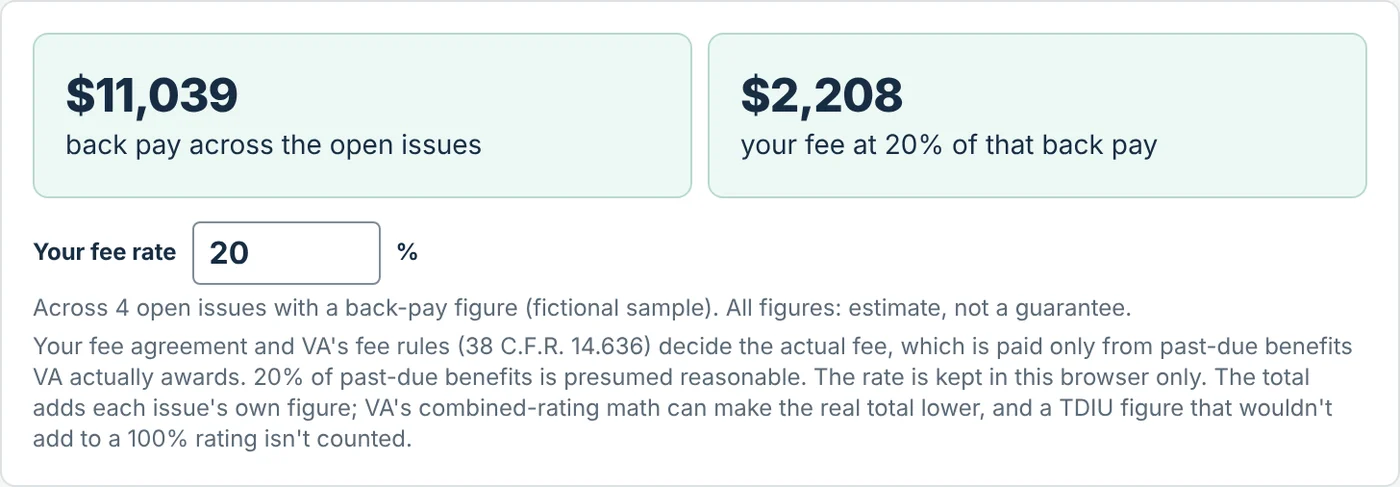
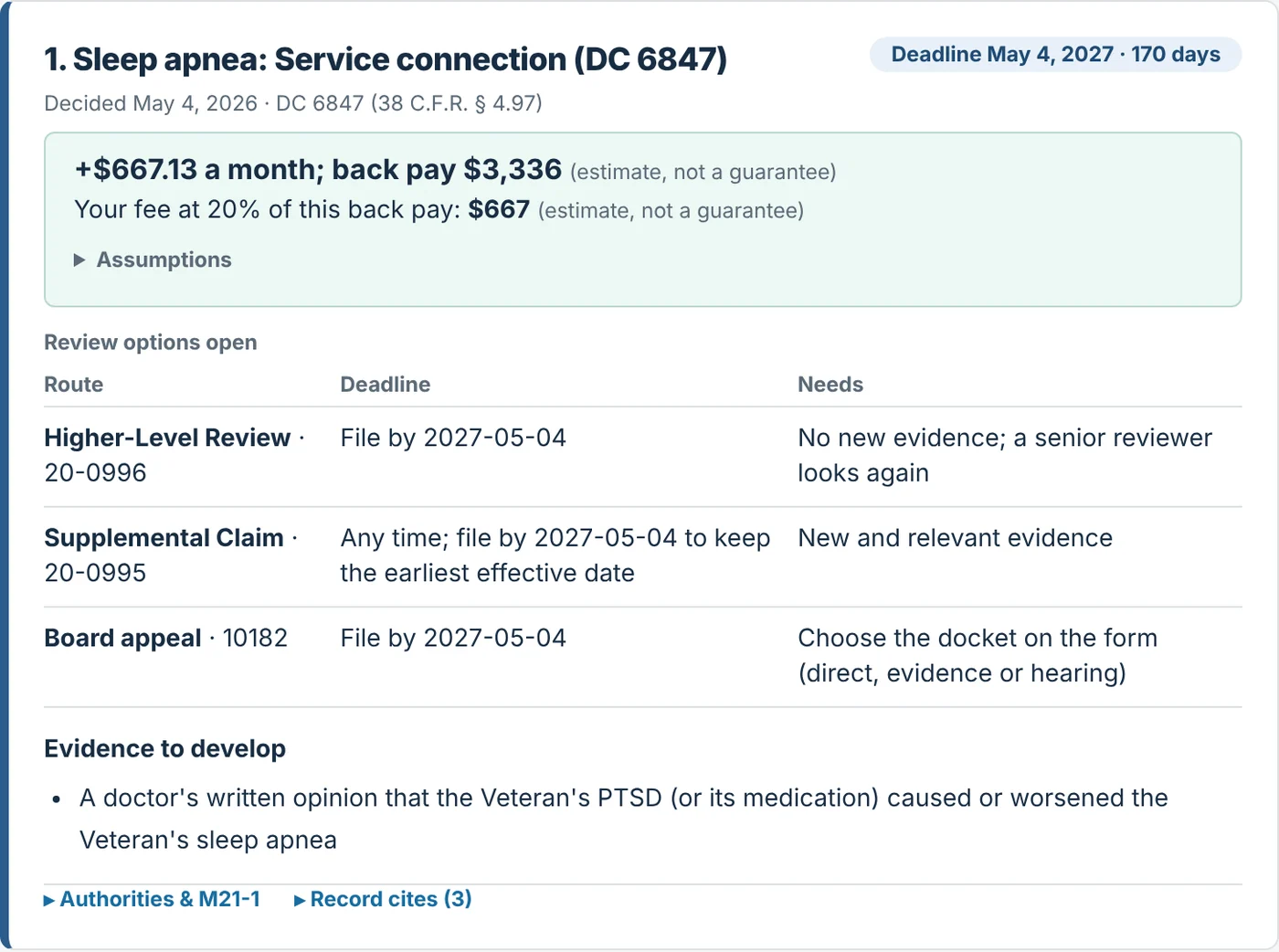
From the claims file to a review form with your client's e-signature
One screen, the representative view, for each review: the issue list (the facts, with page cites) and starting points for your review (a suggested route and a brief outline, for your independent review).
Step 1
Upload the file
A decision letter and the records behind it (PDFs up to 1,000 pages), or the whole claims file as PDFs or ZIP archives, up to 10,000 pages. You download the records and upload them; there's no VA systems connection.
Step 2
Read the issue list
Each issue with its Part 4 diagnostic code, every review option still open and its deadline, the authorities, the record page behind each finding, and the evidence gaps.
Step 3
You pick the route and confirm the form
You choose the issues and the review option, confirm every field, and tick the sign-off. Advocate pre-fills VA Form 20-0995, 20-0996 or 10182 from the review; ClaimScope's name isn't on it.
Step 4
You send it for e-signature and file it
You can send the finished form to your client to sign electronically in your firm's name. You get the signed form back, and you file it with VA yourself.
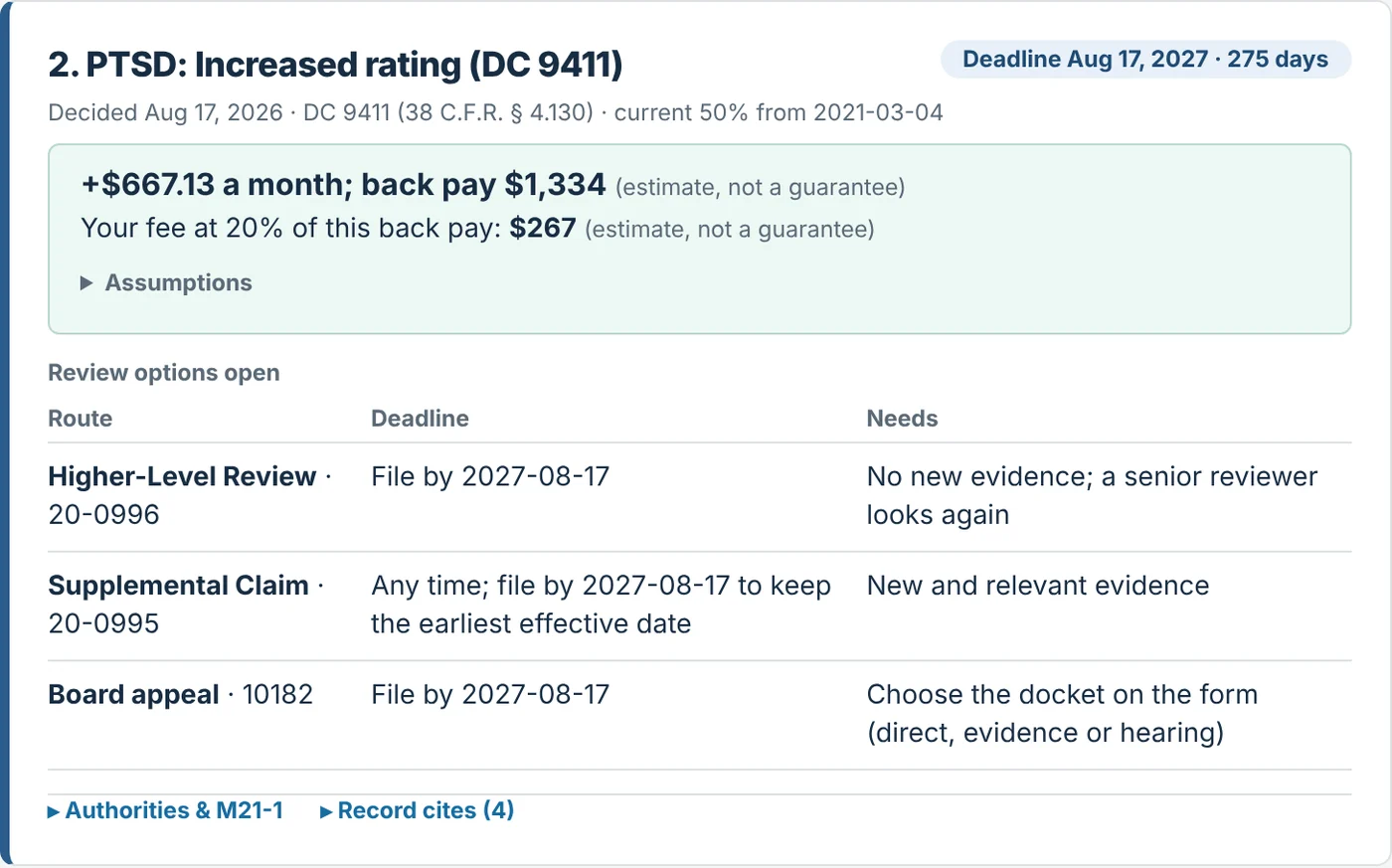
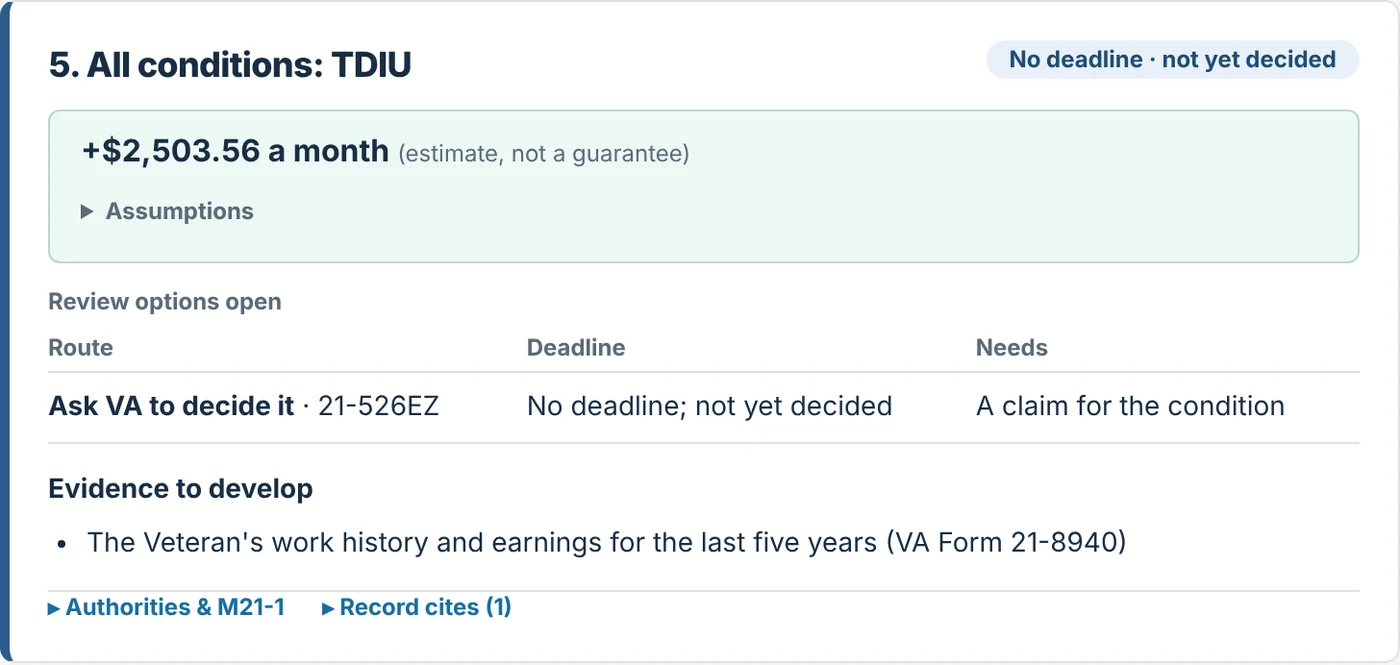
Screens from the sample review of a fictional Veteran. Open the whole sample
Everything in every plan
Live today for verified representatives. Every finding cites the record page it came from, so you can check it.
Client dashboard
Each client's name, your firm's file number and notes, the review status, the earliest open deadline with a day countdown, and, if you enter the intent-to-file date, a countdown to the one-year deadline for the complete claim: red at 30 days or fewer, amber at 90 or fewer. SMC, TDIU and CUE flags are labeled as flags to check, not predictions.
The issue list
For each issue: the diagnostic code with a link to its 38 C.F.R. Part 4 section and the current rating, the review options still open, the deadline, status and confidence, the statute and regulation authorities as formal cites, the record pages relied on, and evidence gaps.
Brief outline in your voice
For each issue VA decided and the review route you're weighing: the direct relief to ask for first, the evidence for and against with page cites, merits before any duty-to-assist remand, and case law only from a list a VA-accredited attorney verified. It also flags a missed VA exam (38 C.F.R. 3.655) and lists each issue's evidence gaps, most decisive first. Labeled for your independent review; you tick a box before you copy it.
Copy the issue list
One button copies the issues as plain text for your notes, marked “Not a filing; verify every cite against the record.”
Reports in your firm's name
Reports and share links (each link works for 14 days) carry your firm's name, your logo and the note “Record review prepared for your firm with ClaimScope analysis.” Turn on white label to leave ClaimScope's name off them (share links still use a claimscopeveterans.com address).
Expert packet for your medical expert
For each issue you pick: the questions for the expert, the legal standard VA applies, what the record shows with page cites, the evidence VA weighed against the claim, the cited pages themselves, and blank space for the expert's own findings and reasoning. Send it by a view-only link that works 1 to 30 days, turn it off at any time, and see each view. It never contains an opinion for the expert to sign.
Pre-filled VA forms
You pick the issues and confirm every field, and Advocate fills in VA Form 20-0995, 20-0996 or 10182 from the review, VA Forms 21-4142 and 21-4142a for private records, VA Form 21-4138 with the statement you type (or blank), and VA Form 21-526EZ for the new conditions you pick. You sign off, and you file it yourself; ClaimScope's name isn't on the form and ClaimScope never writes the statement.
E-signature for your client
You can send a form you finalized to your client to sign electronically, in your firm's name. You get the signed form back, and your client gets a copy. VA Form 10182 asks for an ink signature, so you decide whether to send it.
Pending claims too
You can use it on a client's claim before VA decides. For a pending issue it only analyzes, searches and organizes: route suggestions and argument drafts appear only for issues VA has decided, for your own review.
Spotter, the record chat
Ask a question about the file and get an answer with the record pages it used, so you can check it.
Back-pay calculator
Work out past-due benefits for an issue from VA's own pay tables for each period, with the dependents you enter. Labeled as an estimate, not a promised award.
Staff logins
Invite your staff by email, each with their own sign-in: 1 login on Solo, up to 5 logins on Firm, up to 30 logins on Organization. Staff can approve forms once we verify their own accreditation; other staff see the analysis only.
No law-firm offers
Signed in as a verified representative, your reviews show no law-firm offers or free-call invitations. We contact your clients only to deliver a form you send them to sign, and never use their records for marketing.
A client list without identifiers
You type in each client. The list holds a name, your file number, notes and an optional intent-to-file date, never Social Security numbers, dates of birth or health details.
Deadline reminder emails
When a client's earliest open review deadline or intent-to-file deadline is 60, 30 or 7 days away, one email a day at most to your account's address: the client name, your file number, the deadline and its date, with a link to the client. No record or health details. Turn it off in your portal or from the email.
Why representatives pick Advocate
Built around the decision
Every review option still open for each issue, shown the same way, each with its deadline and a day countdown, from the dates printed in the record.
Checks shaped by Board remands
Duty-to-assist checks follow the reasons the Board gave for sending issues back, and each finding lists comparable Board decisions as examples, never precedent.
An expert packet, not an opinion
Your medical expert gets the questions, the legal standard and the page-cited record, with room for their own reasoning. It never holds an opinion to sign.
Prices on the page
Monthly plans from $99 with C-file reviews included, a 7-day free trial and 30-day money-back. No demo call needed to start.
See the full comparison with VA Claim Helper, Vala and CaseScribe
How the analysis works
What it checks
Each decided issue against the VA rating schedule (38 C.F.R. Part 4) and the evidence quoted in the record; effective dates, the one-year review deadlines and finality, using the dates printed in the record; TDIU, special monthly compensation, secondary conditions, and clear and unmistakable error in older decisions. On a full claims file, it also builds the decision, rating and payment timeline, checks the combined-rating math, and runs PACT Act, MST and hearing-loss screens.
How a finding is built
A finding appears only when the record supports it, with the page it relies on. When the record is silent, the report says so instead of guessing.
How it's tested
An attorney wrote the rules and tests each release before it ships, on records where VA's later decision is already known. In the letter test of October 26, 2026, on 620 sample decision letters written to match VA's formats, it read 97.0% of the 2507 issues and 97.5% of the review deadlines correctly. The known-outcome test so far uses one real claims file (5,435 pages), where it flagged 4 of the 5 issues VA later granted; a single file is a check, not a success rate. False alarms aren't measured yet, and a passing test doesn't predict what VA will decide. Full method and results
Checks shaped by the Board's own remands
We studied why the Board sent issues back in the 31,723 decisions it published from January 2 to April 7, 2026. The duty-to-assist checks follow those reasons, most common first: a needed medical opinion or an inadequate exam, an exam that didn't address aggravation, no exam, and records VA didn't get. Each finding in an Advocate review also lists up to 5 comparable Board decisions, with a link to each on va.gov, as examples of how the Board decided similar issues. Board decisions aren't precedent (38 C.F.R. 20.1303); verify each one yourself.
How Advocate compares
Some tools send documents to VA for you; Advocate doesn't. It pre-fills a review form only from fields you confirm, and you file it. It's built around the decision: every open review option and its deadline, the rating schedule, and the duty-to-assist errors the Board remands for, each with its record page. And it hands your medical expert the record and the questions, not an opinion to sign: an opinion's weight comes from the expert's own reasoning (Nieves-Rodriguez v. Peake, 22 Vet. App. 295 (2008)).
| Feature | ClaimScope Advocate | VA Claim Helper | Vala | CaseScribe |
|---|---|---|---|---|
| Price | Solo $99 a month (1 login; 10 decision-letter reviews and 2 C-file reviews); Firm $399 a month (up to 5 logins; 25 decision-letter reviews and 5 C-file reviews); Organization $499 a month (up to 30 logins; 50 decision-letter reviews and 10 C-file reviews). 7-day free trial of Solo or Firm, card required; 30-day money-back on the first monthly charge | Free plan (intake form only); paid plans from $33 a month for 1 user to $500 a month for 11 to 30 users Source (opens in a new tab) | Free Community Edition; Pro Edition price not listed (book a demo) Source (opens in a new tab) | $85 per case; Express $35 per case; 90-day money-back guarantee Source (opens in a new tab) |
| Full claims file | Included in every plan (2 to 10 a month); packs from $20 each; extra C-file $30 on a plan, $49 without one; up to 10,000 pages, PDFs or ZIP archives | C-file AI analysis $10 per file up to 6,500 pages, then $3 per 1,000 pages Source (opens in a new tab) | AI-powered claims analysis in the Pro Edition Source (opens in a new tab) | Included in the per-case price; results in about 15 minutes Source (opens in a new tab) |
| Fills in VA forms | Yes: you get VA Forms 20-0995, 20-0996 and 10182 pre-filled from the review once you confirm every field and sign off. You can send one to your client to e-sign, and you file it yourself | Yes: "standard form generation", 37 forms listed Source (opens in a new tab) | Yes: auto-populates VA forms, with electronic signature Source (opens in a new tab) | Not stated |
| Sends filings to VA | No. You file every form yourself | Yes: "electronic VA submission" in paid plans (method not stated) Source (opens in a new tab) | Not stated | Not stated |
| Storage | 100 GB to 1 TB by plan; stored documents are kept until you delete them | 250 GB to 1 TB by plan; $3 per extra 100 GB a month Source (opens in a new tab) | Completed VA forms stored Source (opens in a new tab) | Full data export anytime Source (opens in a new tab) |
| Deadlines | For each decided issue, every review option still open with its deadline and a day countdown, from the dates printed in the record; an intent-to-file countdown per client | Emails you as the 365-day deadline after a rating decision approaches Source (opens in a new tab) | Not stated | Not stated |
| What the analysis checks | Each decided issue against its 38 C.F.R. Part 4 diagnostic code; duty-to-assist checks built from why the Board remanded issues; CUE, TDIU and SMC flags; effective dates; up to 5 comparable Board decisions per finding, as examples, never precedent | Surfaces potential claims, secondary conditions and key evidence Source (opens in a new tab) | Surfaces evidence, conditions and gaps Source (opens in a new tab) | Nexus and rating-increase opportunities, medical and toxic-exposure chronologies Source (opens in a new tab) |
| Ask questions of the file | Yes: the record chat answers with the pages it used | Not stated | Yes: questions across the whole file Source (opens in a new tab) | Yes: Ask AI, answers cite the pages used Source (opens in a new tab) |
| Medical expert | Expert packet per issue: the questions, the legal standard, page-cited evidence for and against, the cited pages and blank space for the expert's own reasoning, by a view-only link that works 1 to 30 days and can be turned off. Never an opinion for the expert to sign | Not stated | Not stated | Guest links to selected pages and PDF export; Ask AI's suggested prompts include creating an IME letter Source (opens in a new tab) |
| Logins | Staff logins: 1 login on Solo, up to 5 logins on Firm, up to 30 logins on Organization | 1 to 30 users, by plan Source (opens in a new tab) | Not stated | Unlimited users per organization; guest users for outside collaborators Source (opens in a new tab) |
| Security shown on the site | AES-256 encrypted storage, an encrypted processing disk, malware scanning, two-step sign-in available, and a business associate agreement with our AI provider. No independent security audit report yet More | Google login and two-factor authentication Source (opens in a new tab) | Links a Trust Center Source (opens in a new tab) | An independent security audit badge and a health-privacy compliance badge Source (opens in a new tab) |
| Who built it | Gabe, a VA-accredited attorney, who tests each release on records with known VA outcomes and publishes the results More | Says it's made exclusively for accredited agents and attorneys Source (opens in a new tab) | Not stated | Built with Hill & Ponton, a disability law practice Source (opens in a new tab) |
Other companies' facts are from their own public pages, checked November 2, 2026. “Not stated” means we didn't find it there, not that the product lacks it. Spot something out of date? Email support@claimscopeveterans.com.
Plans
Choose a plan when you apply. You start reviewing records once we verify your accreditation; if we can't, we refund the full charge.
Solo
$99 a month
- 1 login
- 10 decision-letter reviews a month
- 2 C-file reviews a month
- Issue-by-issue analysis with page cites
- Pre-filled VA review forms (20-0995, 20-0996, 10182) from fields you confirm
- E-signature for your client
- Expert packets for your medical expert
- Spotter, the record chat
- Deadline reminder emails
- Back-pay calculator
Firm
$399 a month
- Up to 5 logins, with staff logins for your team
- 25 decision-letter reviews a month
- 5 C-file reviews a month
- Issue-by-issue analysis with page cites
- Pre-filled VA review forms (20-0995, 20-0996, 10182) from fields you confirm
- E-signature for your client
- Expert packets for your medical expert
- Spotter, the record chat
- Deadline reminder emails
- Back-pay calculator
Organization
$499 a month
- Up to 30 logins, with staff logins for your team
- 50 decision-letter reviews a month
- 10 C-file reviews a month
- Issue-by-issue analysis with page cites
- Pre-filled VA review forms (20-0995, 20-0996, 10182) from fields you confirm
- E-signature for your client
- Expert packets for your medical expert
- Spotter, the record chat
- Deadline reminder emails
- Back-pay calculator
- 1 for $30one at a time
- 5 for $125$25 each
- 10 for $220$22 each
- 25 for $500$20 each
One charge each, no renewal. Your plan's own C-file reviews are used first. Pack reviews can be used for 12 months while your plan is active.
No monthly plan? One C-file review: $49One full C-file review, any client, without a plan: up to 10,000 pages, ZIPs accepted.
30-day money-backIf Advocate isn't right for you, email support@claimscopeveterans.com within 30 days of your plan's first monthly charge and we refund that charge in full (one first charge per representative). Later charges, one-time C-file reviews and C-file packs aren't covered.
A decision-letter review covers the decision letter and the records behind it, as PDFs up to 1,000 pages. A C-file review covers the whole claims file, PDFs or ZIP archives, up to 10,000 pages. Monthly allowances reset on your billing date, and unused reviews don't roll over. Your plan's C-file reviews are used first. Plan holders can add more in packs (5 for $125, 10 for $220, 25 for $500) or one at a time for $30; pack reviews can be used for 12 months after purchase while you keep a monthly plan, and are lost if the plan ends. Monthly plans renew until you cancel. New representatives can try Solo or Firm free for 7 days (card required; the days start when we verify your accreditation).
Document storage: 100 GB on Solo, 500 GB on Firm, 1 TB on Organization, and 10 GB on an account with no monthly plan. Stored documents are kept until you delete them. Record chat: 100 questions a month on Solo, 300 questions a month on Firm, 1,000 questions a month on Organization; 25 questions per review on an account with no monthly plan.
The cost is your own overhead. Normal overhead isn't a reimbursable expense (38 C.F.R. 14.637(c) (opens in a new tab)), so don't bill it to a Veteran. VSO representatives may not charge Veterans (38 C.F.R. 14.636(b) (opens in a new tab)); a VSO's plan is the organization's own cost.
What it never does
You stay the representative.
The limits are built into the software: a review form is pre-filled only after you confirm every field and tick the sign-off, doctor-letter drafts are removed from representative reports, and argument drafts never appear in share links, expert packets or downloads. An expert packet holds the record and the questions, never an opinion for the expert to adopt.
ClaimScope analyzes and organizes the client records you're authorized to share. Its starting points (route suggestions and argument drafts) are for your independent review and stay in your account. You can pre-fill VA review forms from fields you confirm and send a form you finalized to your client to sign, and you file it yourself. ClaimScope never files or submits anything to VA, doesn't write medical opinions, give legal advice, contact your client except to deliver a form you send for signature, or connect to VBMS or VA's Accredited Representative Portal. You're responsible for your client's consent, for checking every citation and deadline against the record, and for all advice and filings.
- Never writes medical opinions or IME letters. Route suggestions and argument drafts stay in your account, labeled for your independent review, and never go to your client.
- Never fills in VA Forms 21-22 or 21-22a or a fee agreement. Review forms are pre-filled only from fields you confirm.
- Never files or submits anything to VA. A form goes to your client for signature only when you send it.
- Never connects to VBMS or the Accredited Representative Portal. You download the records and upload them.
- Never gives legal advice or predicts how VA will decide.
How it works
Step 1: Apply
Sign in, give your firm or organization name, your accreditation (attorney, claims agent or VSO representative) and your VA accreditation number, and accept the Representative Terms of Use.
Step 2: Choose a plan and pay
Pick Solo, Firm or Organization, or a one-time C-file review. Your billing period starts when you pay. If we can't verify your accreditation, we refund the full charge and cancel any monthly plan.
Step 3: We verify your accreditation
A founder checks your number on VA's accreditation search and emails you when your account is ready. Until then, you can't upload records or start reviews.
Step 4: Start reviewing records
Add a client, upload the records you're authorized to share (PDFs, or a whole C-file as its ZIP), and work through each issue's code, route, deadline, authorities and page cites.
Once you're verified, file each review under a client, work through it in the representative view, and copy the issue list or the technical outline into your notes, or share a report in your firm's name. What you file is yours.
Client authorization and privacy. Upload only records you're authorized to share: a VA Form 21-22 or 21-22a on file, or your client's written authorization, and informed consent where your rules require it. ClaimScope doesn't contact your clients, except to email a form you send them to sign. Privacy notice · Service providers · Representative Terms of Use
Security and privacy
- Encrypted storage and processing
- Records are stored with AES-256 encryption and processed on a server whose disk is encrypted.
- Your clients stay yours
- Every file request is checked against the account that owns it, so each representative sees only their own clients.
- Secure sign-in
- Two-step sign-in is available for your account. It is required on the founder accounts ClaimScope uses to verify representatives and support customers. Staff you invite get their own logins (see Questions below).
- Uploads are checked
- Uploads are scanned for malware before anything reads them.
- Three outside services, no more
- Records go only to Cloudflare (hosting, storage and database), Amazon Web Services and DigitalOcean (processing) and OpenAI (analysis). OpenAI reads the text under zero data retention: it isn't stored or logged after the answer comes back and isn't used to train OpenAI's models, under a signed zero data retention amendment, data processing agreement and business associate agreement. Beyond those, a client's records reach only a medical expert you choose, through an expert packet link you send.
- No ad trackers, no AI training
- Client records are never sold, never used to train AI models, and never reach ad networks: the portal and its upload pages load no ad or analytics tags.
- Deletion
- Deleting your account removes your advocate profile and client list. Database backups roll off within 30 days.
Details: Privacy notice for representative accounts and our service providers.
For your compliance file
General information, not legal advice. Check the rules that apply to you.
- Preparing and filing are yours
- As an accredited representative, you may prepare, present and prosecute claims (38 U.S.C. 5901 (opens in a new tab); 38 C.F.R. 14.627 (opens in a new tab), 14.629 (opens in a new tab)). ClaimScope never files, signs or sends anything for you or your client. It analyzes and organizes the record, and its argument drafts and route suggestions are labeled drafts for your own review and independent judgment, so the preparing and filing stay yours.
- Competence, diligence and confidentiality
- 38 C.F.R. 14.632 (opens in a new tab) requires competent, diligent representation and bars disclosing information VA provides without the claimant's authorization. You are responsible for your client's authorization, and informed consent where your rules require it, before you upload. Lawyers may also look at ABA Formal Opinion 512 (opens in a new tab) on generative AI tools and 477R (opens in a new tab) on securing client information.
- The cost is overhead
- Normal overhead isn't a reimbursable expense (38 C.F.R. 14.637(c) (opens in a new tab)), so don't bill this tool to a Veteran as an expense. VSO representatives may not charge Veterans at all (38 C.F.R. 14.636(b) (opens in a new tab)), so a VSO's plan is the organization's own cost.
- VA systems access
- Never use ClaimScope to log in to VBMS, and never share your VA system credentials with anyone (38 C.F.R. 1.602 (opens in a new tab); see 1.600 to 1.603). Download the records, then upload them.
The Representative Terms of Use set out these responsibilities in full.
Who built it
ClaimScope was built by Gabe, a VA-accredited attorney (accredited September 18, 2026), Army infantry Veteran of Afghanistan and former Army JAG, and his co-founder Erick, an infantry combat Veteran.
Questions
Can I use it on a pending claim?
Yes. On a pending issue, Representative accounts only analyze, search and organize; route suggestions and argument drafts appear only once VA has decided an issue, and they are for your own review. Nothing is ever filed or submitted for you.
Does it connect to VBMS or the Accredited Representative Portal?
No. There is no connection to any VA system. Download the records you're authorized to access, then upload them as PDFs. Never give anyone your VA system credentials.
Do I need my client's consent?
Yes. Before you upload, you need a VA Form 21-22 or 21-22a on file or your client's written authorization, and informed consent where your professional rules require it. The Representative Terms of Use make this your responsibility.
Who can see my clients' records?
Only your account: every file request is checked against the account that owns it. Records go only to the three outside services listed above, and to a medical expert only if you send them an expert packet link. We contact your clients only to deliver a form you send them to sign, and never use their records for marketing.
Can I bill my clients for it?
No. Treat it as overhead: normal overhead isn't a reimbursable expense under 38 C.F.R. 14.637(c). VSO representatives may not charge Veterans (38 C.F.R. 14.636(b)); a VSO's plan is the organization's own cost.
When can I pay, and what if I'm not verified?
You can choose a plan right after you apply. New representatives can try Solo or Firm free for 7 days, card required. The trial includes up to 3 decision-letter reviews and 1 C-file review. The 7 days start when we verify your accreditation, and we email you before the first charge. Otherwise your billing period starts when you pay. You can upload records and start reviews once we verify your accreditation on VA's accreditation search; if we can't verify it, we refund the full charge and cancel any monthly plan.
What can I upload?
For a decision-letter review, PDFs: the letter and the records behind it, up to 1,000 pages. For a C-file review, the client's claims file as PDFs or ZIP archives, up to 2 GB per file and 10,000 pages in all: one from your plan's monthly C-file allowance, an extra one for $30 on a plan, or $49 without a plan.
Can my staff have their own logins?
Yes: Solo includes 1 login, Firm includes up to 5 logins, Organization includes up to 30 logins, yours included. You invite staff by email from your account, each gets their own sign-in, and only staff whose own VA accreditation we verify can sign off on drafts and forms; other staff see the analysis only.
Client authorization and privacy. Upload only records you're authorized to share: a VA Form 21-22 or 21-22a on file, or your client's written authorization, and informed consent where your rules require it. ClaimScope doesn't contact your clients, except to email a form you send them to sign. Privacy notice · Service providers · Representative Terms of Use
ClaimScope is software from ClaimScope LLC. It analyzes and organizes records and isn't legal advice. It is independent and is not affiliated with, endorsed by, or part of the U.S. Department of Veterans Affairs. Use of a representative account is governed by the Representative Terms of Use.